 Lesson # 3
Tomorrow will be Holy Week Day Four – Silent Wednesday. It
was Scholars speculations that Jesus and his disciples spent this day resting
in Bethany in expectation of the Passover. Bethany is the place where Jesus Christ raises
Lazarus from the dead.
Lesson # 3
Tomorrow will be Holy Week Day Four – Silent Wednesday. It
was Scholars speculations that Jesus and his disciples spent this day resting
in Bethany in expectation of the Passover. Bethany is the place where Jesus Christ raises
Lazarus from the dead.
Remembering Holy Week & my work
It reminds me of the time when
I was still in the Philippines and managing my Art and Sign shop when Holy Week comes. I marked it as one of the busiest months in the Philippine calendar. Since more than 85 percent of the Philippine population
is Roman Catholic, you will expect the whole nation are observing and mostly participating the event. Just like in our municipality, 90 percent are Catholic
devotees that gathered every Lenten. And aside from candles, rosaries and any religious
artifacts, T-shirt printing was also in demand on that day. Religious group are mostly the customers we
encountered the whole month or even before that month. Some of them brought sketches and samples of their group logos for T-shirt printing design.
And I hate deadlines. So, additional manpower was needed and spending extra time to finish everything before Wednesday ends. Because everyone need to spend a day for resting and commemorating the sacrifices Jesus Christ had given us to be saved.
-----------------------------------------------------
Preconcept design
Preconcept is a rudimentary idea intermediate between an ordinary precept
and a fully developed concept.
The problem with preconcept designs is redoing the layout
that consumes additional time. You can ask additional charge for the job anyway.
Color Separation using Photoshop
With Photoshop, making pattern
for t-shirt printing becomes easier.
Let
me share with you my knowledge about doing the step-by-step procedures on Color Separation using Photoshop which I guess all layout artists of the best t-shirt printing companies also did. Even the known Printing Companies use this methods before feeding it to their Automatic Silk Screen Printing Machine.
1. After
carefully enhancing your design in RGB
(Red, Green and Blue) mode, convert it to CMYK
mode (Cyan, Magenta, Yellow, Black – K is used instead of B, so that it does not get confused with Blue)
for process-color offset printing.
2. Open
Filter / Pixelate / Halftone. Just
leave the default setting: (Max. Radius:
8 / Channel 1: 108 / Channel 2: 162 /
Channel 3: 90 and Channel 4: 45.) Then press OK. Wait till color halftone
processing finished. Take note: If the output is larger dots or smaller dots than the desired result,
adjust your image size first before applying the halftone effect.
3. This
will be the result.
4. Click
Channels at the palette menus (located
at the right side of PSD workspace), select only one channel per print. Prepare it for printing.
These images below shows the dotted pattern. It was my intention to select two channels for the first 3 images to emphasize the colors (Please refer to step #4 for the printing matters).
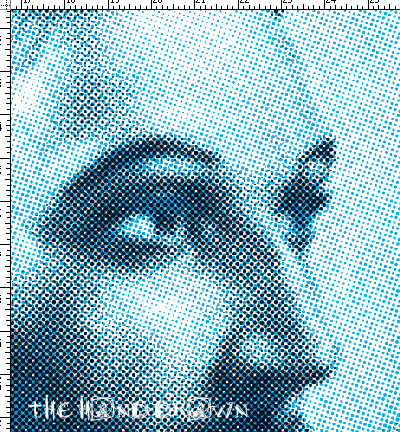 |
| Color Halftone | Cyan + Black |
 |
| Color Halftone | Magenta+ Black |
|
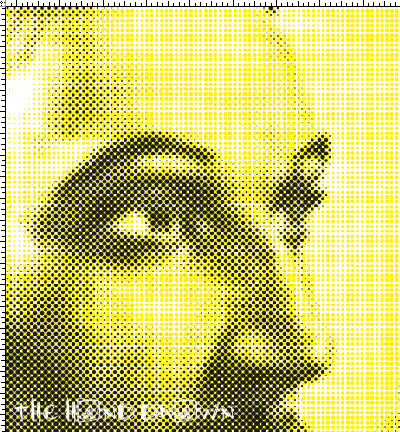 |
| Color Halftone | Yellow+ Black |
|
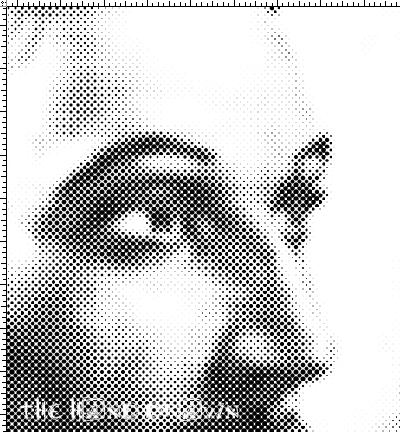 |
| Color Halftone | Black |
5. Setup
your printer. Make it sure to set your printer into grayscale printing.
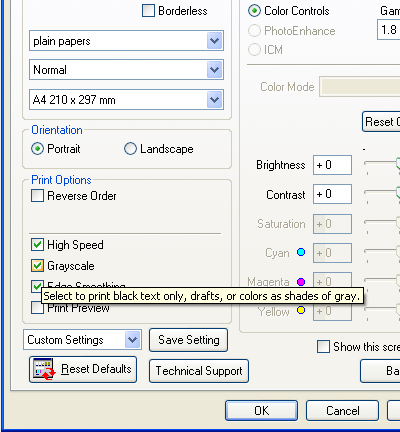 |
| This Grayscale setting will depends on your printer options. |
|
Now we are ready to print our pattern per color.
-----------------------------------------------------
As GOD's servants, let us allocate time to worship Him not only during Holy Week but the entire days of our lives. I want to leave this verses of what Bible says about having a busy life. GOD bless us all.
"Do not be anxious about anything, but in everything by prayer and supplication with thanksgiving let your requests be made known to God. And the peace of God, which surpasses all understanding, will guard your hearts and your minds in Christ Jesus."


